On-Campus Jobs

Resume, CV, Cover Letter & LinkedIn
On-Campus Jobs ➔
Jobs & Internships
Events, Workshops & Fairs
What Can I Do With This Major?
Choose a Career Direction or Major
Build Connections (Networking & More)
Interviewing Preparation
Graduate & Professional Programs
Career Advising Appointments
Resources & Career Tools
Free Professional Headshots

On-Campus Employment
Find On-campus jobs here on Handshake
Join SFSU Handshake today!
- Sign on to Handshake
- Complete your profile and upload your resume.
Step 1: Search for Jobs
On-campus positions are most commonly listed on Handshake, SF State’s online job listing platform. Students can also reach out to departments directly to ask about current positions.
Step 2: Apply for Jobs
After identifying positions you are qualified for, follow the instructions to apply on the job listing. Job application materials typically include:
- Contact information
- Resume
- Cover letter
- Class schedule
Check out Hiration and our online resources for resume and cover letter help.
Once you apply for a position, you will be able to review the status of your application in Handshake.
Tip: Schedule an appointment with a Career Counselor to review your resume or attend a workshop on how to apply to jobs.
Step 3: Interview for Jobs
Come to interviews prepared to speak about yourself, your interest in the role, and why you think you would be a good candidate.
Tips:
- Visit campus department/s that you have applied to and ask for the hiring manager. Take a moment to introduce yourself, let them know that you have applied, and how interested you are in the position.
- Schedule an appointment with a Career Counselor or attend a workshop to learn best practices for interviews.
Step 4: Accept or Decline Your Job Offer
Once you receive a job offer, let your prospective employer know as soon as possible if you intend to accept or decline the position as on-campus positions tend to be competitive. If you are unsuccessful in your job search, other employers like Stonestown Galleria or nearby restaurants commonly hire students.
Step 5: Confirm Your Work And Class Schedule With Your Employer
Once you have accepted your job offer, you and your employer will work together to create your work schedule. If you haven’t already, share your class schedule with them and communicate any previous obligations that may conflict with work hours. Once your start date is confirmed, your employer will share paperwork to complete prior to beginning work.
Current/Incoming Students
SF State student employees may work up to 20 hours per week (part-time) during the spring and fall semesters and up to 40 hours per week (full-time) during summer sessions and semester breaks.
Student employees must be in good academic standing and enrolled in at least 6 units as an undergraduate student and 4 units as a graduate student.
Incoming students may begin working on campus seven days before the start of their first semester.
International Students
It is possible for international students who are visiting on an F-1 or J-1 visa to work on campus. Check in the Office of International Programs to learn more: https://oip.sfsu.edu/ocec
Common On-Campus Roles for Student Workers
There are many different types of job opportunities available to student workers. Work schedules are typically arranged around your class schedule and availability. On-campus roles typically fall into one of the following categories:
- Student Assistant and Federal Work Study Assistant: Support departments with a range of job types related to the department’s function on campus
- Instructional Student Assistant: Assist professors with research, teaching, facilitating group discussions, grading papers, and tutoring
- Other: Work for auxiliary on-campus employers (such as J. Paul Leonard Library, Associated Students, Sodexo Dining Services, or any other on-campus commercial employers)
Common On-Campus Employers
- Associated Students
- Audio-Visual Services (Ground Floor of J. Paul Leonard Library): Hires students to assist with the maintenance and delivery of equipment on campus including overhead projectors and video monitors.
- Department of Foreign Language & Literatures (HUM 475): Various faculty members hire international students who are native speakers of languages that are taught at SF State as teaching assistants.
- Disability Programs & Resource Center (DPRC)
- Health Promotion & Wellness
- J. Paul Leonard University Library
- Mashouf Wellness Center
- SF State Campus Bookstore
- SF State Housing (Housing & Residential Services Office, Ground Floor of Mary Ward Hall): Hires students for Resident Assistant and other positions to work in the University's various on-campus housing facilities.
- Sodexo Dining Services
- Tutoring and Academic Support Center (TASC)
- University Police Department (UPD) (Corporation Yard, West Side of Campus near Lake Merced Blvd): Hires students at the beginning of each semester to serve as "student escorts" during the evening hours accompanying students from various campus locations to their car, on-campus residence, etc.
Read more about the job search process below:
Step 1: Send an email to Student_i-9@sfsu.edu with the following information:
-
Your full and complete first and last name as it appears on your identification
-
SF State student email (No personal emails)
-
Your SF State Student ID Number #
International Students: F‑1 and J‑1 students must complete the online On‑Campus Employment Certification (OCEC) form and receive confirmation of their work eligibility from an international student advisor before starting the I‑9 process. To complete the OCEC form, please follow the instructions at: https://international.sfsu.edu/ocec
Step 2: I-9 Tracker profile will be created by I-9 Verification Specialist from Campus Safety
-
An automated message from I-9 Tracker will be sent to your SF State student email. Please check your spam or junk folder if you do not see it in your inbox. Log into I-9 Tracker and complete Part 1 (Section 1).
Step 3: A second email will be sent to your SF State student email with instructions on how to complete your Form I-9 (Part 2). The instructions email will include what documents are acceptable to verify your identity and employment eligibility, and where to go in person to present your documents on-campus:
-
You will need to present one or more acceptable documents that are listed here or in the attached List of Acceptable Identification for I-9 Verification. You must present original documents; scans or photos of your documents are not accepted.
-
Students can verify their identification and supporting documents in person at Campus Safety (UPD) located on-campus at 100 North State Drive, San Francisco, California, 94132. (See map below).
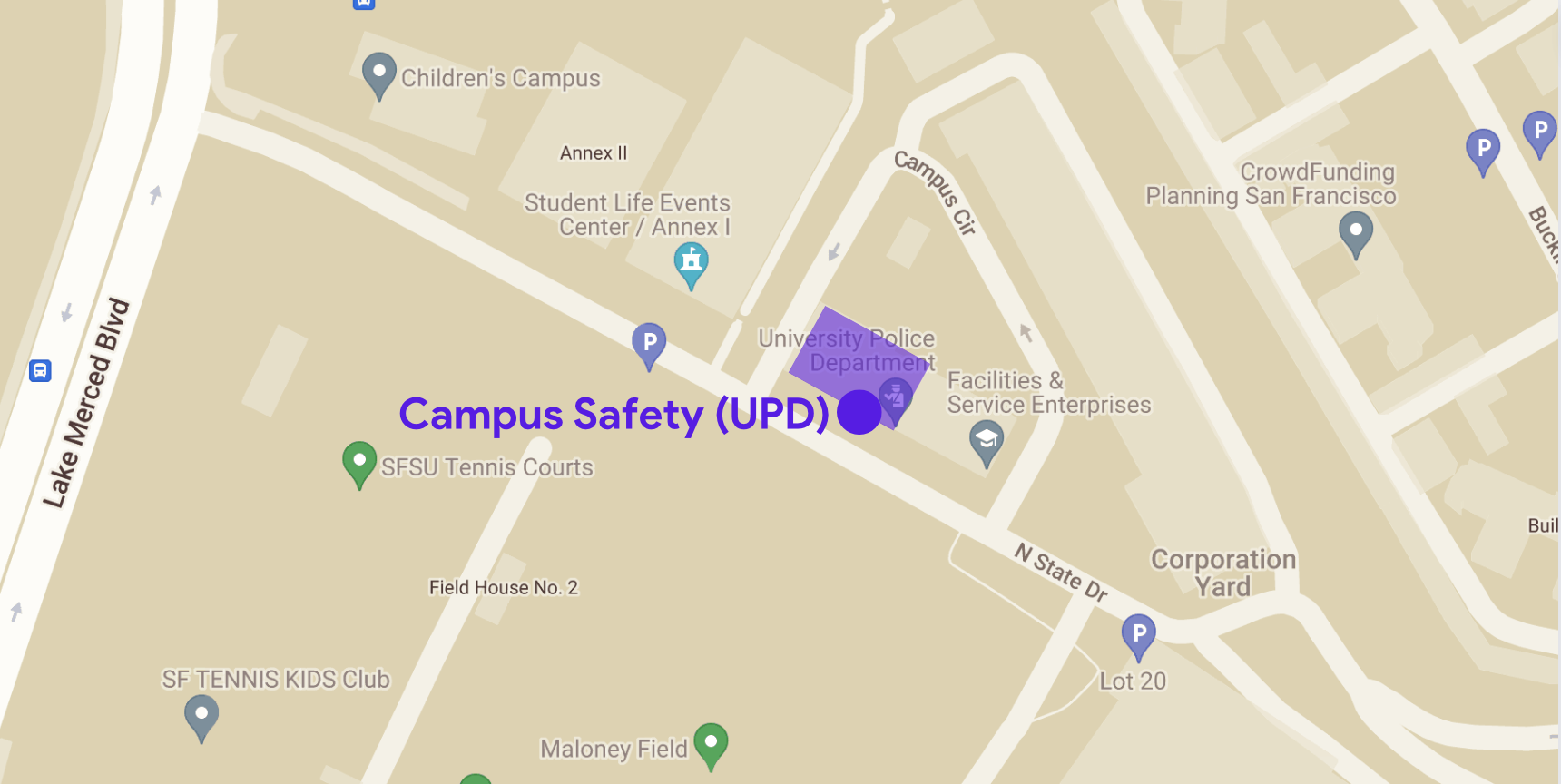
Drop-in hours are available Monday through Thursday (M/T/W/Th) from 8:30AM to 3:00PM.
You can also make an appointment for I-9 verification online by going to the following link and selecting the appointment calendar: Calendly - Fingerprint or I-9 Appointment Calendar.
Step 4: After your I-9 form has been completed and your documents verified, notify the hiring department. The hiring department will provide all the required payroll forms below to the student via DocuSign for completion.
- W-9 form (CSU Student Payroll Action Request)
- CSU Form SSA-1945 - Information About Social Security
- Affordable Care Act (ACA) Form
- CANRA Form (Child Abuse and Neglect Reporting Act
Graduate Assistant (GA) or Graduate Teaching Assistant (GTA):
GA and GTA will complete the I-9 with their hiring departments.
Auxiliary Positions:
Complete I-9 with the on-campus employer.
Auxiliary positions refer to positions at Sodexo, Associated Students, Inc., University Cooperation (U-Corp), SFSU Bookstore, or any other on-campus commercial employers.
Remember, NO STUDENT MAY BEGIN WORK until after their I-9 verification has been completed.
I-9 Verification is not available on holidays, or when the campus is closed. Please check the online calendar for upcoming holidays and dates when the campus will be closed.
Student workers are paid once a month. Paydays are listed on the Payroll Calendar. In order to receive your paycheck, you must log and submit your time online in Gateway. Once your hours are submitted, your hours will be reviewed and approved. Your first paycheck will be a paper check. You can also enroll in direct deposit to receive your paycheck directly in your bank account.
Please check your email to confirm that your hours have been reviewed and approved. If you are experiencing any issues with submitting your time or do not receive a confirmation email, please contact your manager.
How to Report Your Time Online (PDF Guide)
- Log in to Gateway with your SF State Global Login
- Under Launchpad, select HR Self Service
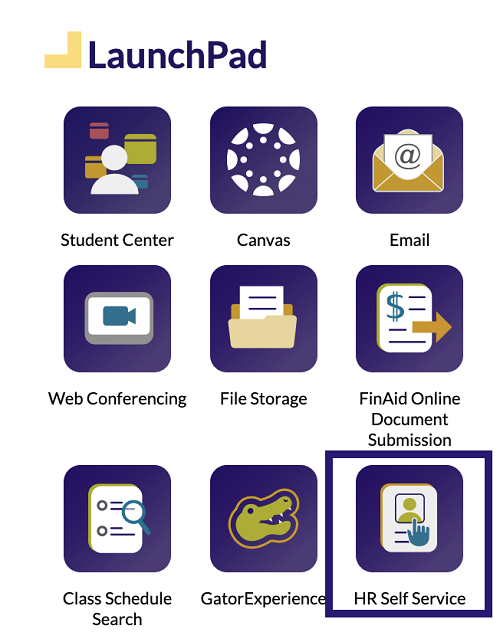
- Under the list of menu options, select My Time
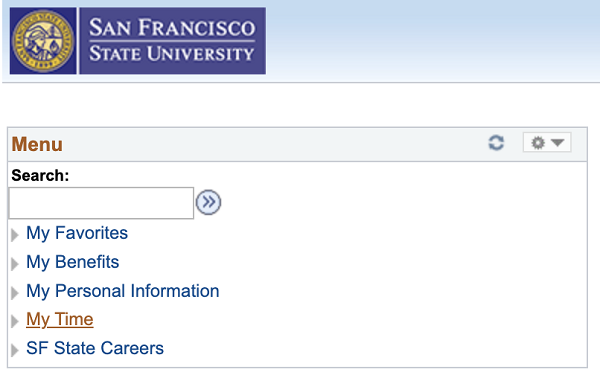
- Select Timesheet
- Under View By, select week, day, or time period (i.e., the whole month). After selecting which option you’d like to view by, hit Refresh
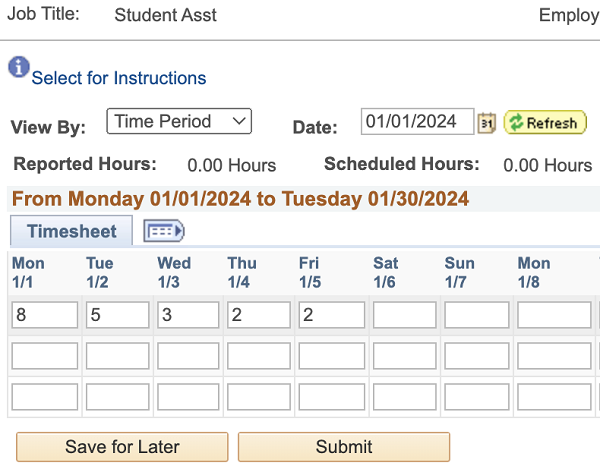
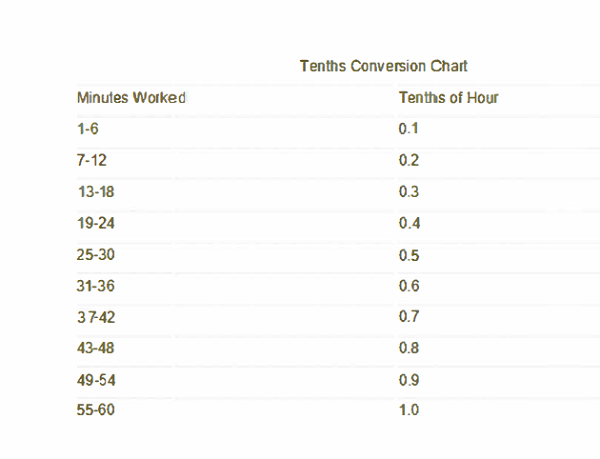
- Enter the number of hours worked under each date. When reporting hours worked, use the chart below to indicate if you worked a full hour or part of an hour. For example:
- If you worked for three hours but arrived to work 10 minutes late, that would be 2.9 hours worked
- If you worked for one and a half hours, that would be 1.5 hours worked
- If you worked for two hours and eight minutes, that would be 2.2 hours worked
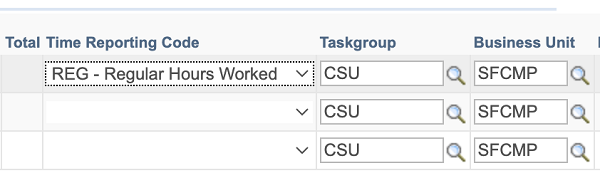
- For Time Reporting Code, select REG - Regular Hours Worked
- Once you’ve entered the information, you can select Save for Later or Submit
- Once your hours are submitted, your approvers will be notified
How to Enroll in Direct Deposit
-
- Log in to Gateway with your SF State Global Login
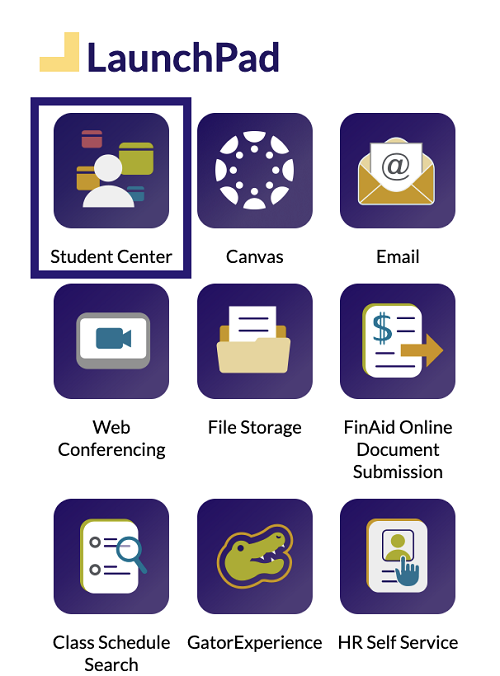
- Under Launchpad, select Student Center
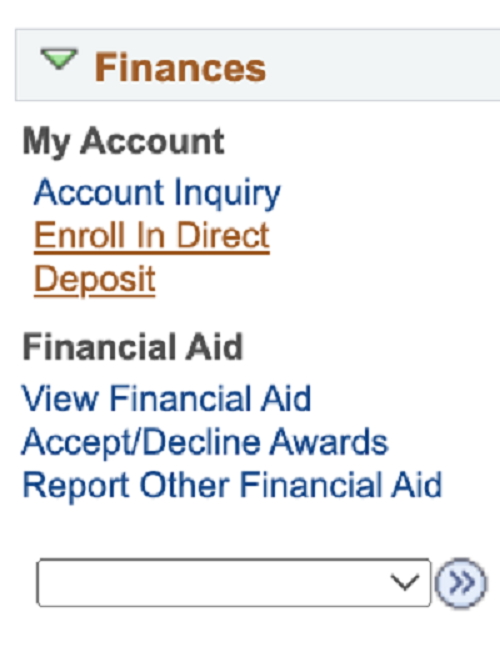
- Under Finances and My Account select Enroll in Direct Deposit
- Select Checking or Savings
- Enter your Routing Number and Account Number
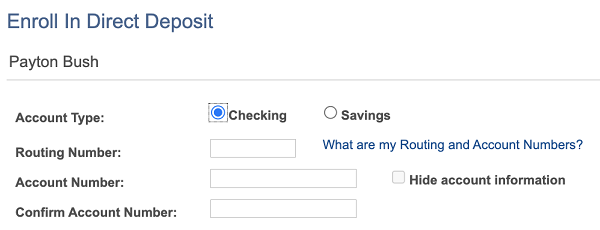
- Select the checkbox to acknowledge the Terms and Conditions
- Select Submit
- You will then receive an email confirming that you have added direct deposit to your account
How Many Hours Can Students Work?
SF State student employees may work up to 20 hours per week (part-time) during the spring and fall semesters and up to 40 hours per week (full-time) during summer sessions and semester breaks.
Can Students Work Multiple On-Campus Jobs?
Yes, if students work within the maximum number of hours allowed per week.
Can Students Use Federal Work Study?
Federal Work-Study is a federally funded financial aid program. It increases available part-time employment for students who need financial assistance while giving them the opportunity to gain practical work experience. Those who wish to work in the work-study program must be approved by the Financial Aid Office prior to being hired. For more information, please contact the Financial Aid Office.
How Will On-Campus Employment Impact Student Taxes?
On-campus employers are not able to provide direct tax advice or guidance for how to fill out tax-related forms. For more information, please review IRS form W–4 and California form DE-4.
Notice for Student Employees
HEERA Notice of Intent to Conduct Election